
Labour supply timesheet template
A client-ready monthly timesheet for construction and manpower supply in the UAE: roster, attendance codes, trade summary and three sign-offs, in Excel and PDF.
- Free, no sign-up
- Excel and PDF
- Dates fill in from the period
Download the template
The Excel version fills in dates and weekdays from the period you enter and adds up hours, absences and amounts for you. The PDF is a blank to print and fill in by hand on site.
Three steps, no sign-up.
- 1
Download
Pick the Excel version to fill in on a computer, or the PDF to print.
- 2
Enter the period and workers
Dates and weekdays fill in from the period; list each worker once with a unique ID.
- 3
Record hours, then sign off
Hours or codes daily, trade totals on the second sheet, then prepared, verified and approved.
What is in it
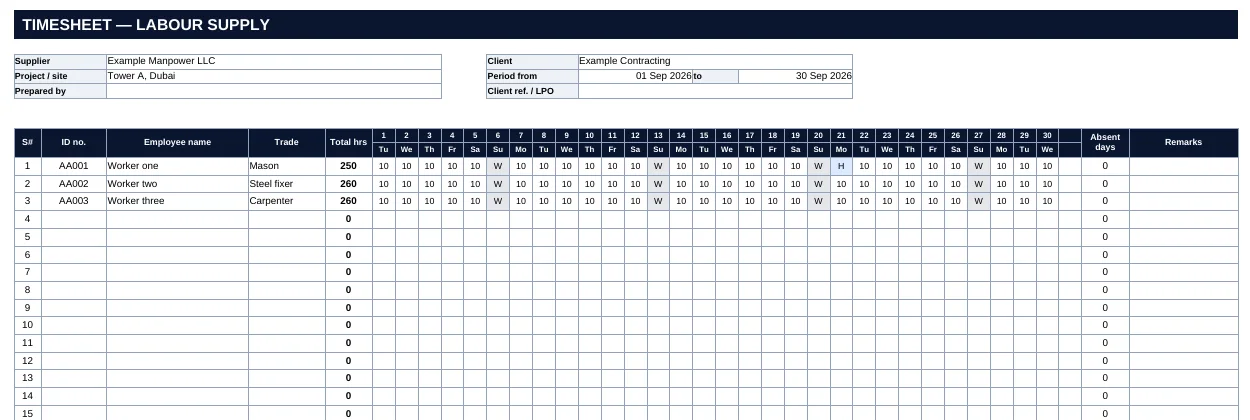
- Header: supplier, client, project or site, the period covered, who prepared it and the client reference or LPO.
- Roster: one row per worker with ID, name and trade, one column per day with the weekday shown, total hours and absent days.
- Attendance codes with a legend: hours as numbers, A for absent, W for the weekly off day, H for a public holiday.
- Summary by trade and project: hours, rate and amount per line, then additions or deductions, VAT and the net payable.
- Sign-off: prepared, verified and approved blocks with name, signature and date.
- Notes: submission terms so they are agreed in writing, not argued about later.
How to use it
- Enter the supplier, client, project and the exact period. A timesheet with no clear period is the easiest to dispute.
- List each worker once, with a unique ID, so two people with similar names can never be merged.
- Record hours daily, not at month end, and use the codes for everything that is not a worked day.
- Group the hours by trade and project on the second sheet, using the rate agreed for each.
- Have the preparer, your verifier and the client’s representative sign before you invoice, and attach the signed timesheet to the invoice.
The reasoning behind each part is in our guide to the construction timesheet format for labour supply, and how to stop client timesheet disputes covers what to agree with the client first.
When a template is not enough
A spreadsheet works well for a handful of workers on one project. Once the same hours have to feed payroll, a WPS file and invoices for several clients, retyping them into each is where errors and disputes start. See timesheet software for UAE construction and manpower teams, where approved hours become the payroll and the invoice without being typed again, or compare ManpowerSync with Excel. Working out what rate to put on the summary? Try the manpower hourly rate calculator.
Stop rebuilding this sheet every month.
Timesheet software produces the timesheet, the payroll and the invoice from the same approved hours, with nothing retyped.
Questions, answered.
Is the timesheet template free?
Yes. Download the Excel or PDF version, use it as often as you like, and add your own letterhead.
How do the dates fill in?
Enter the period start and end in the header of the Excel sheet. The day numbers and weekdays for each column fill in, and days beyond the end of the period are left blank, so it works for 28, 30 and 31-day months and for periods that cross a month end.
What do the attendance codes mean?
Type hours worked as a number, or a code: A for absent, W for the weekly off day and H for a public holiday. Hours are added up automatically, absent days are counted, and the codes are colour-coded so a page reads at a glance.
Does it calculate the invoice totals?
The second sheet multiplies hours by rate for each trade and project, adds any allowed additions or deductions, applies VAT (5% by default, editable) and shows the net amount payable. Check the rates and VAT treatment against your contract.
Can I change the layout?
Yes. It is an ordinary Excel file with no locked cells, so add columns, rename the codes or put your logo in the header.
Other tools you may need.
UAE gratuity calculator
Free UAE gratuity and end-of-service calculator for Dubai, Abu Dhabi and the other emirates. Enter basic salary and dates for the amount under Decree-Law 33 of 2021.
Read moreManpower hourly rate calculator
Free calculator for the hourly rate to charge for UAE manpower supply: salary, visa, camp, transport, gratuity, overhead and margin, spread over billable hours.
Read moreWPS SIF file checker
Free WPS SIF file checker for UAE payroll. Paste or upload a salary file and see totals, IBAN, date and format problems before your bank rejects it.
Read moreUAE IBAN validator
Check a UAE IBAN instantly: length, AE format and check digits, with the exact mistake if it is wrong. Validate a whole list of IBANs for a payroll file at once.
Read moreFree online time clock
Free online time clock: clock in and out from any browser, see hours by day and download them as a CSV. Saved on your device only, no sign-up.
Read moreSee ManpowerSync on your own workforce.
Payroll, timesheets, billing and compliance on one set of records. Bring your current files; nothing to re-key.