Sign in
Supplier portal

A subcontractor portal for UAE manpower suppliers

Subcontractor crews, off email and into one system. Suppliers see their own demands and payments, and nothing of yours.

  • Demands answered with a quote
  • Workers and timesheets submitted by them
  • Payment status they can check themselves
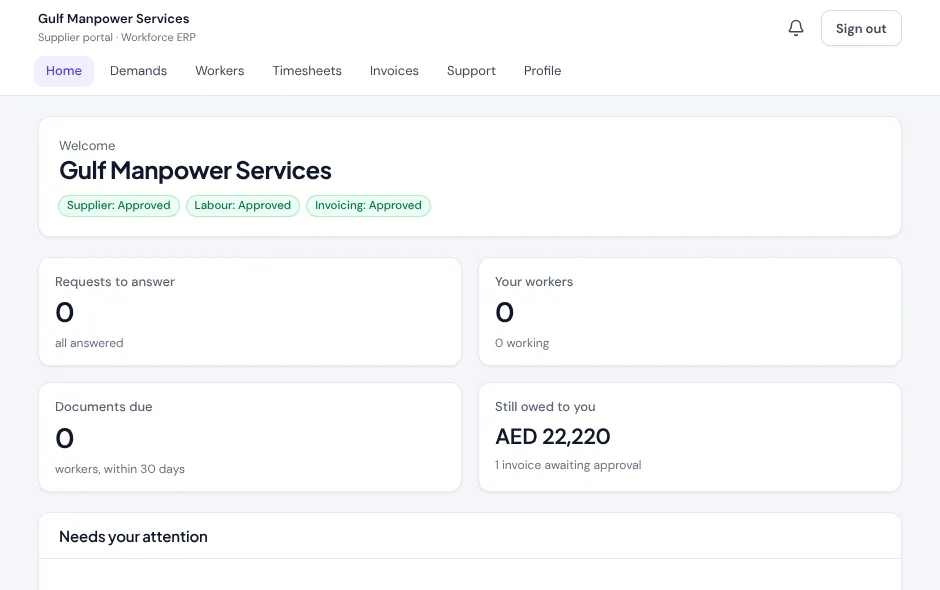
The supplier portal home for Gulf Manpower Services: requests to answer, workers, documents due, AED 22,220 still owed, and approval status badges.
Their records onlySeparate sign-in
Still owed to youAED 22,2201 invoice awaiting approval
  1. Demand
  2. Quote
  3. Workers
  4. Paid
Check payments
1thread per demand: request, quote and workers together
0of your clients, margins or other suppliers visible to them
1approval queue, shared with your own team's hours
24/7payment status without a call to finance
How it works for them

Your subcontractors, working from the same records as you.

Instead of a spreadsheet emailed back and forth, a subcontractor signs in to their own portal.

1

You send a demand

A request for a trade goes out from your demand list, with the offers sent and accepted tracked on the request.
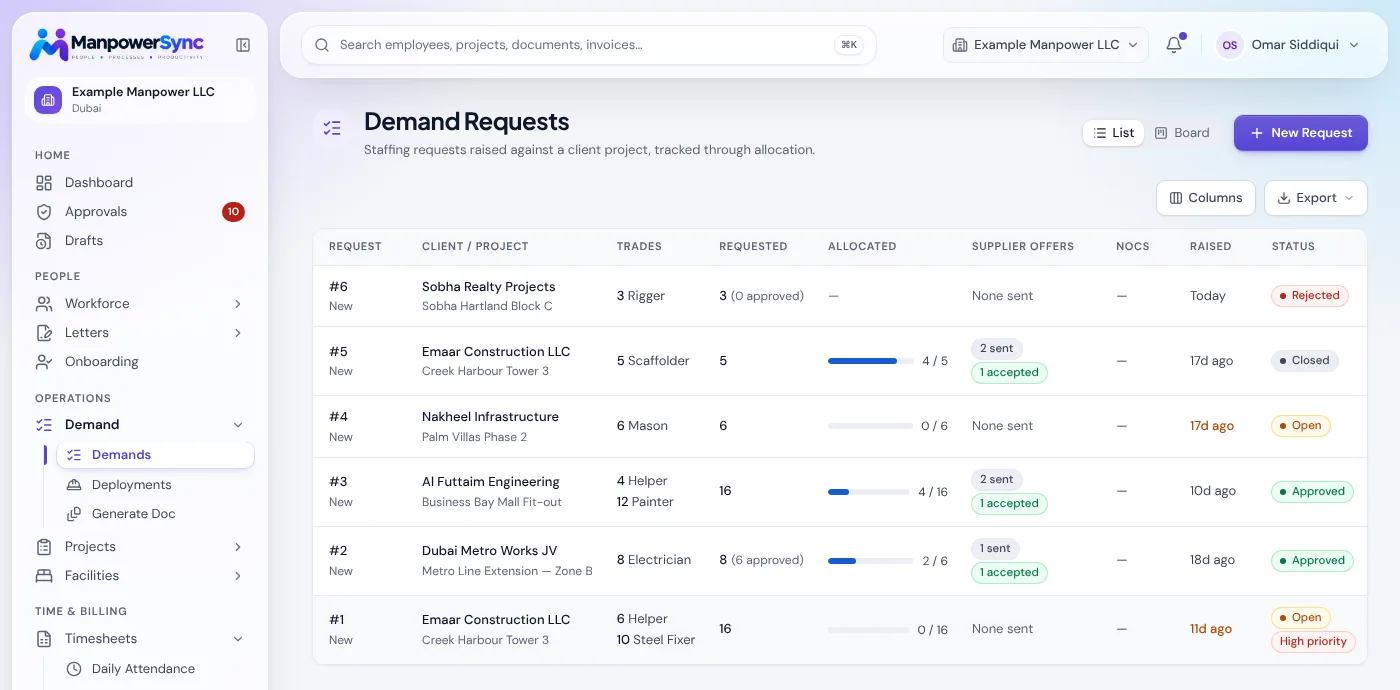
The staff-side demand list showing supplier offers sent and accepted per request.
2

They quote and propose workers

The subcontractor answers each request in their portal, accepting with a quote or declining with a reason, and proposes the specific workers they would send.
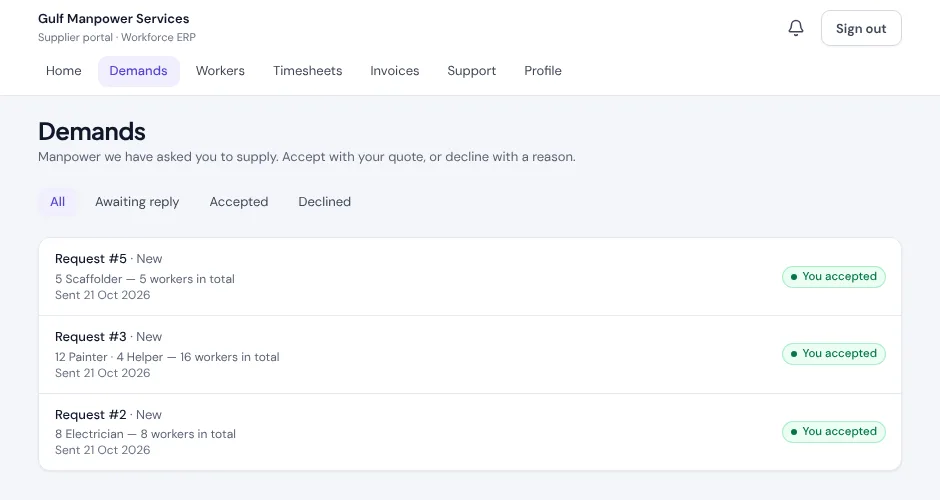
The supplier portal's Demands list with three requests, each marked You accepted.
3

They submit hours and follow payment

Their crews' hours go into the same approval queue your team approves from, and approved and paid status is visible to them without a phone call.

The supplier portal home showing AED 22,220 still owed and one invoice awaiting approval.
The portal

Supplier portal, walled off from your data.

Subcontractors submit their own workers and hours, and see only what is theirs.

A demand, its quote and its workers, in one thread

A request for a trade goes out, the subcontractor quotes and proposes workers against it, and the whole exchange stays attached to that one demand instead of scattered across emails.

  • Demand notifications
  • Quotes per trade line
  • Worker submissions
The supplier portal Demands list.

Timesheets & payments

Their crews' hours are submitted into the same approval queue, and payment status is visible to them without asking.

Timesheet submissionApproval visibilityPayment tracking

Walled off

A supplier sees only their own demands, workers and payments.

  • Own records only
  • Separate sign-in

Payments

What's approved and what's paid.

ApprovedPaid

Subcontractors submit workers themselves

A subcontractor logs in to submit the crew and hours against a demand, the same record your own team approves from.

  • Demand receivedNotification to the supplier
  • Quote and workers submittedAgainst the trade line
  • Hours submitted for approvalInto your approval queue
  • Payment marked paidVisible in their portal

Fewer "any update on our payment?" messages

A subcontractor can see what's been approved and what's been paid without a phone call to your finance team.

The supplier portal home with the amount still owed.
Before and after

Subcontractors without the forwarded spreadsheets.

Email and WhatsApp

Chasing every crew

  • Crew lists emailed back and forth
  • Quotes lost in long threads
  • Hours retyped from supplier sheets
  • Payment status asked by phone
  • Everyone sees a different version
With ManpowerSync

They work from the same record

  • Suppliers submit their own workers
  • Quote and workers on the demand
  • Hours straight into your approval queue
  • Payment status visible to them
  • Their records only, a separate sign-in
FAQ

Questions, answered.

What can a subcontractor see in the portal?

Only their own demands, workers and payments. They never see your clients, margins or other suppliers, and they sign in separately from your staff.

How do subcontractors submit their crews' hours?

Through their own portal, into the same approval queue your team approves from, instead of by emailed spreadsheet.

How does a demand work with a supplier?

A request for a trade goes out, the subcontractor quotes against it and proposes the specific workers they would send, and the whole exchange stays attached to that one demand.

Bring your subcontractors onto ManpowerSync.

Invite a supplier and they can submit their first crew the same day.